
YOUR COMMISSIONS DESERVE A CLEARER PICTURE
Less chasing payments.
More confidence in your book.
Try AceAgent Commissions with your own statements for 7 days. See what paid, what still needs attention, and whether your client book matches the carrier’s.
No statement mapping or import templates
Use supported carrier statements as you download them. AceAgent reads the data without asking you to match columns or reformat your spreadsheets.
Know which enrollments paid
Match CRM client conversions with statement payments and keep unpaid enrollments in view.
Keep Medicare Advantage true-ups in sight
Track the initial payment and true-up separately for enrollments you mark as new to Medicare Advantage.
Reconcile your CRM and carrier books
Compare your exported CRM client list with carrier Book of Business reports and review the differences.
Know which carrier statements are due
See which carriers are current, due soon, or need an update, with statement schedules that keep your commission data current.
Make statement imports part of your routine
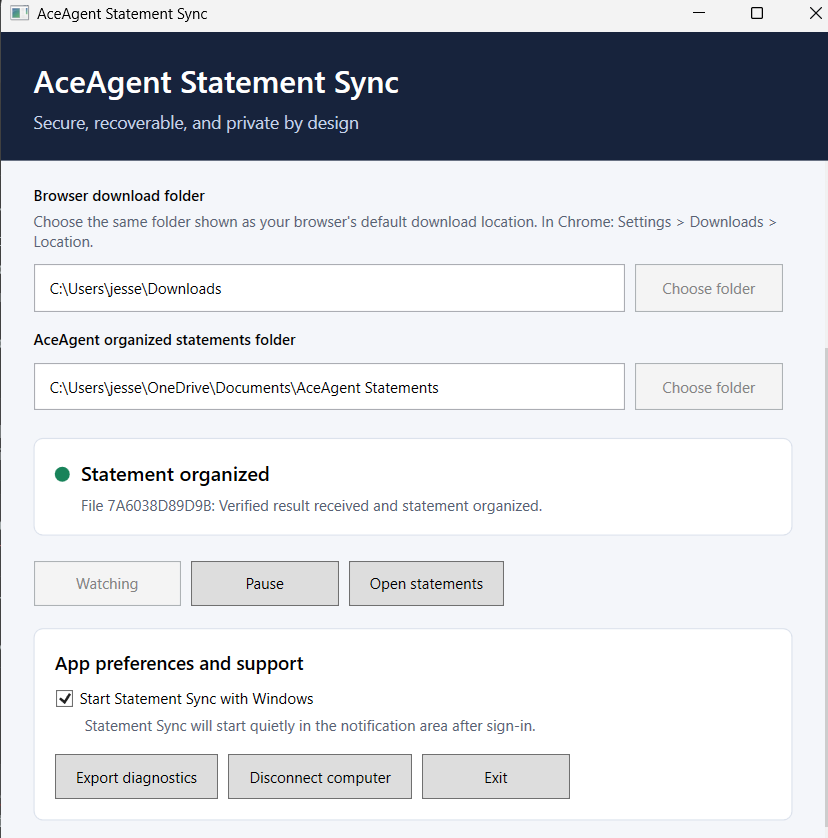
The AceAgent Statement Sync Desktop app uploads completed statement downloads from your chosen Windows folder.
YOUR DESKTOP APP IS INCLUDED
AceAgent Statement Sync Desktop app
After setup, click Download in your carrier portal. The app finds the statement in your downloads folder, imports it into AceAgent, and organizes the file by carrier and statement year in your selected statements folder.